
LLMs were the norm at the end of 2024. Companies were releasing better and better models every single week, and suddenly, nobody was amused by the news of a new LLM anymore. We could use them for virtually anything that could be solved in a textual format.
Most people have also learned quickly that models acing yet another benchmark with a slightly higher score than the competitor's best model meant little to nothing in real-world use cases. Many models are likely optimized for passing these benchmarks rather than being usable. At the end of the day, benchmarks are what bring in that sweet venture capital to survive for another 6 months. The best benchmark is still how useful the new model is for you. That's why sometimes people prefer an older model over the newest one, even though the new one performs the best according to every single relevant benchmark on Earth.
However, even though LLMs were integrated into our lives and jobs entirely, most tasks solved by LLMs included a single iteration, meaning one back-and-forth message exchange. A question from us, and a response from the model. Sure, some conversations grew to hundreds of messages, but those were still built up manually one by one. Models didn't have any autonomy in the decision-making process.
Then, we invented AI agents.
What Is an AI Agent?
An AI agent is an autonomous system that is aware of its environment, has access to various tools and knowledge sources, and has the capability to build up its own message history and long-term memory, and finally, to finish the given task with little to no human interaction.
Around this time, when 2024 suddenly turned into 2025, plenty of blog posts titled "2025: The Year of AI Agents" started to pop up everywhere as people and companies were realizing this is what the next big thing will be, and this is where they have to shift their focus.
Agentic frameworks started to appear, many of them requiring almost no coding knowledge at all to build our own AI agents.
I started working for a new company around this time, and I have quickly realized those blog posts have made an accurate prediction: every single project I was working on at this new place had something to do with agentic code generation. And most importantly, most of them weren't simple chatbots but tailor-made agentic solutions for a specific problem like API generation, unit test generation, automated UI testing, and the like. Don't get me wrong, we also had (and still have to this day) multiple private chatbot projects, but even these were closer to an agentic system than a simple chatbot. They had internal state, decision-making, reasoning, and access to tools and resources to help them come up with the requested answer.
However, even this wasn't enough. We have realized that clients are starting to understand the potential of AI and want more of it. Requests started becoming more complex, and instead of simple dedicated agents, we had to start thinking in workflows.
And we weren't alone.
The Year of AI Workflows
Being a few days away from 2026, I can confidently say this is where the world is heading, and it's not just me who has realized this trend.
Since there is a new gold rush starting, and the best opportunity in a gold rush is to sell shovels, companies started doing exactly that. However, in this case, the shovels were the workflow builder platforms.
But first, let's define the new buzzword.
What Is an AI Workflow?
An AI workflow is a network of autonomous AI agents that collaborate to complete tasks with minimal human intervention.
It might sound complicated at first, but trust me, building your own AI workflow in 2026 is simpler than ever.
I collected the best AI workflow builder platforms in the following section.
n8n
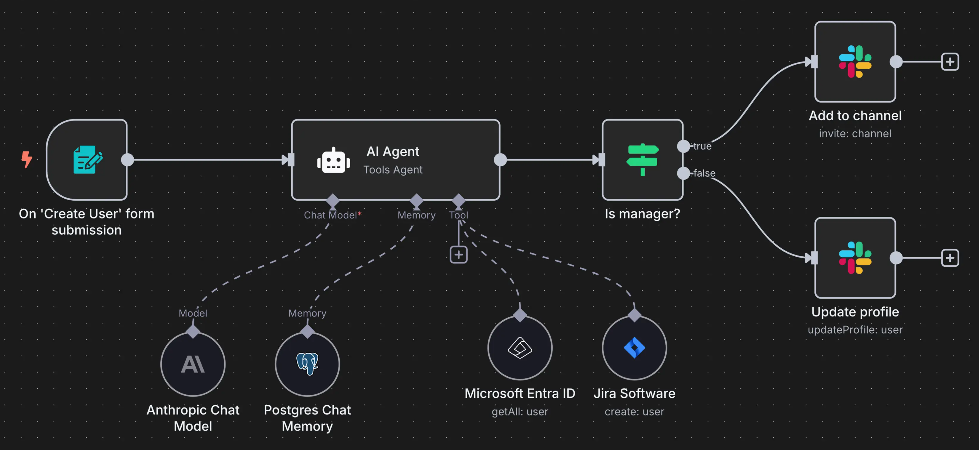
There was another trend going hard in 2025: people sharing their n8n workflows on LinkedIn and other social media platforms, claiming that their workflows had replaced their sales or marketing team entirely, and now they are a one-man-army with different workflows working for them.
I will leave you to decide how much of that was true, but one thing is for sure: n8n made it ridiculously easy to build entire workflows from scratch, and you don't necessarily need any coding knowledge to build one, although it certainly helps.
Additionally, their UI is also captivating, making a screenshot of a workflow the best possible visual hook for a LinkedIn post. The company is truly a marketing mastermind, if you ask me.
The amazing thing regarding n8n is that building a workflow is as simple as dragging and dropping boxes on an empty sheet and connecting them together with lines that define how information flows from one box to another.
Normally, you could totally use n8n to simply connect APIs and not use AI at all in the process, but you would potentially miss one of the best parts of the entire library should you choose to do so.
The Agent Node
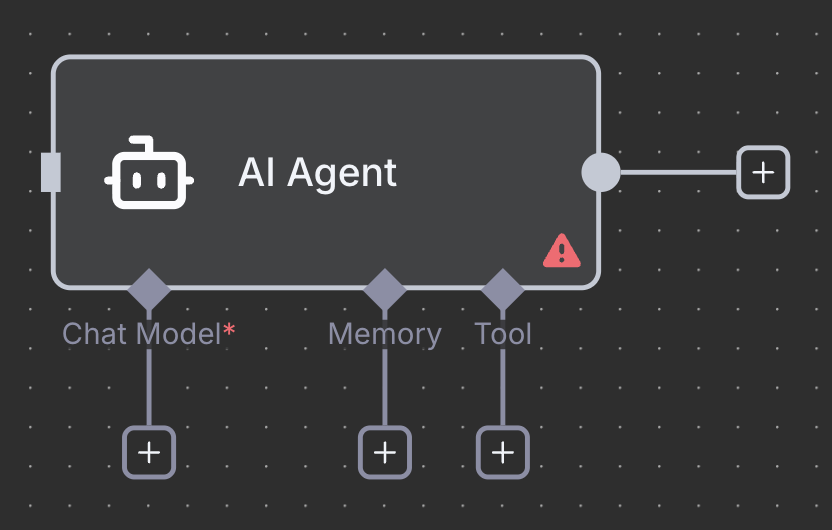
n8n has a special node called “AI agent” which helps build a single agent with a system prompt, a replaceable model, multiple tools, a database connection for long-term memory, and optionally, an output parser to guarantee a specific output format every single time.
Once you connect multiple agent nodes together, you have an AI workflow.
Going deep into what is possible with n8n could be an entire post in itself, and I'd like to keep this one just as a summary of options, so let's now continue with a different solution.
This one is made by Google.
Google Workspace Studio
If you are a Google Workspace user, you have access to something called the Workspace Studio, which is a platform where you can connect all your Google apps together with the help of Gemini. Similar to n8n, you don’t need any coding knowledge to define workflows across your apps.
As I am writing this post, access to Workspace Studio might be limited due to the popularity and high volume of requests, but they are working on resolving this temporary issue as soon as possible.
Some apps you can connect in Workspace studio are Gmail, Google Drive (including Docs and Sheets), Google Calendar, and, of course, Gemini, just to mention the most popular ones, but they are constantly working on adding new Google apps to Workspace Studio, as it is currently in its alpha development phase.
Examples
- When you receive an email from a specific sender, alert you via Chat
- When someone fills out one of your forms, send a summary of the filler’s responses to your team
You can also start from a template instead of coming up with your own workflow, if you prefer to see an example first.
Microsoft Copilot Studio
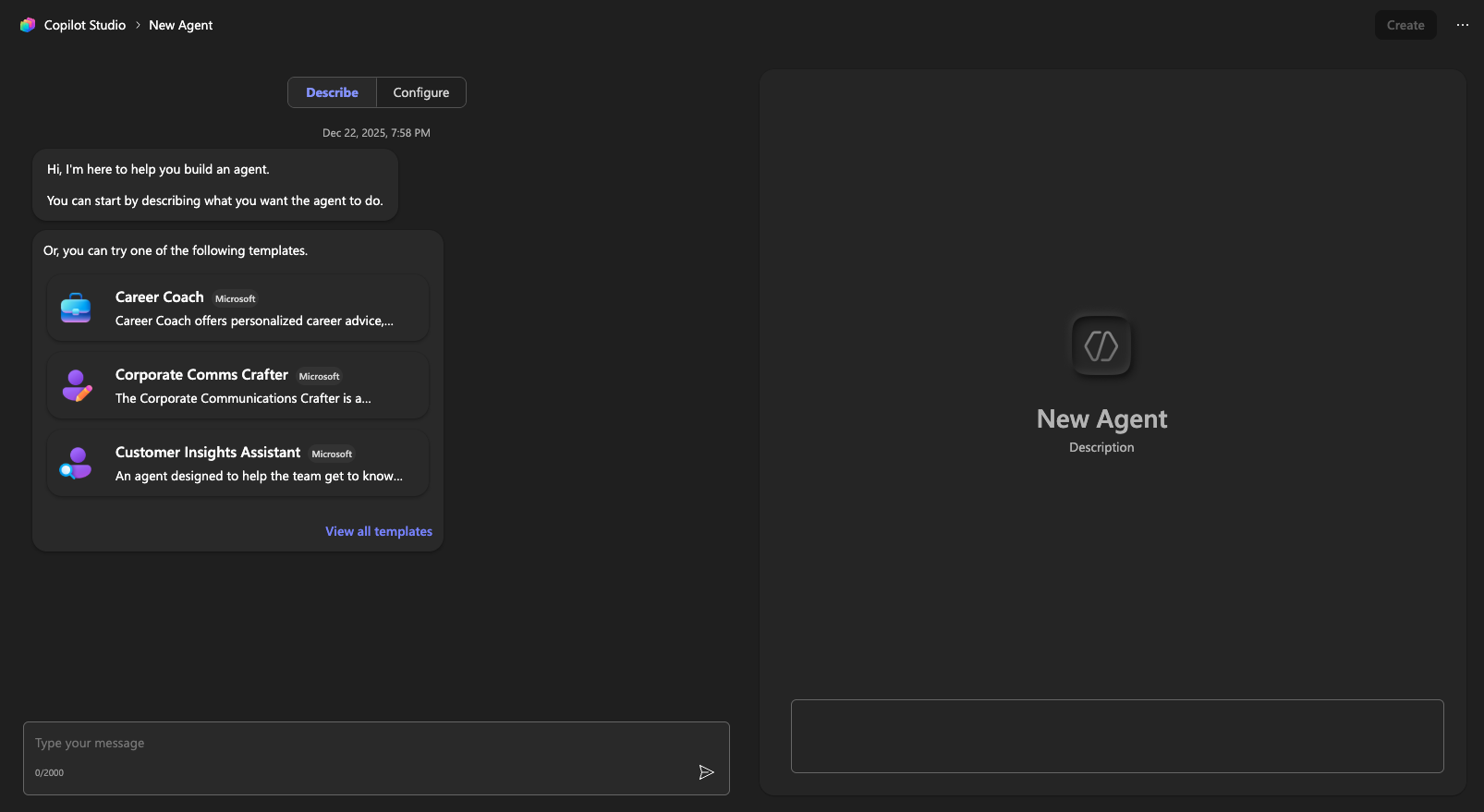
Similar to Google, Microsoft also came up with its own solution. Microsoft Copilot Studio is their way of integrating every Microsoft service into an AI agent that you can later transform into an agent flow if you’d like to add more steps to your agent.
The way to build an agent with Copilot Studio is almost identical to how you can build a Custom GPT in ChatGPT: you have two panes open, one where you speak to an LLM that helps you build the agent, and another one where you see the agent itself in its current state.
Copilot Studio claims to support over 1500 connectors you can add to your agent, and this doesn’t even include the tools that you are allowed to use, including your favorite MCP tools.
OpenAI Agent Builder
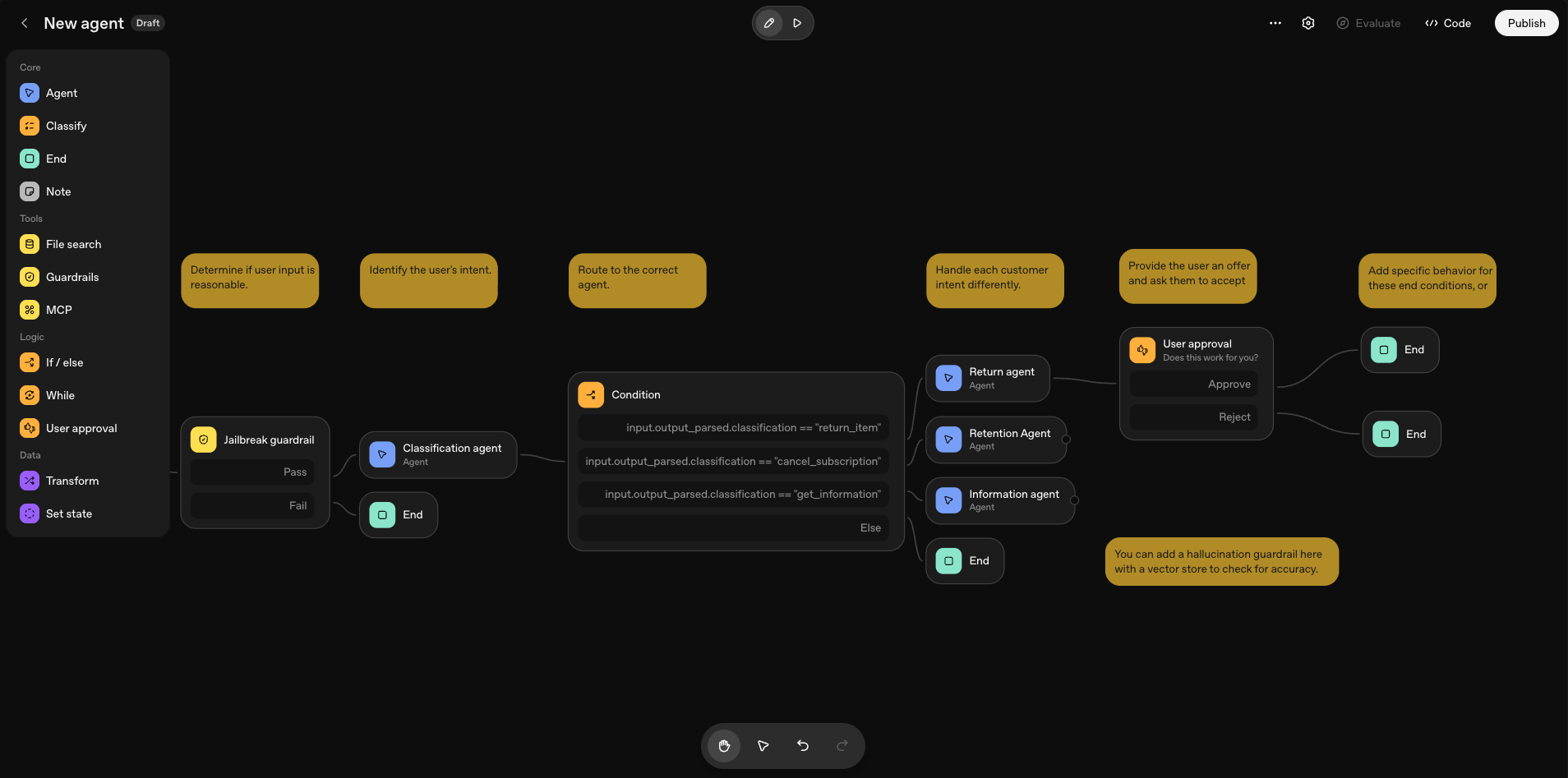
If it is related to AI, OpenAI has to be mentioned. Their platform for the same problem is called the Agent builder, which is oddly similar to how n8n looks.
You can define Agents, branches, loops, human-in-the-loop steps, tools, and more, most of these without any coding knowledge required.
Agents created in the Agent builder are chatbots with more guided logic than just simply speaking to ChatGPT. However, an agent created here has to be deployed somewhere to be accessible and callable, unlike n8n workflows that have triggers, or Google’s and Microsoft’s solutions that natively integrate into the corresponding platform. This isn’t that much of a limitation of the platform, just something to keep in mind before you want to use your new workflow right away.
OpenAI agents can be integrated into products using the Agents SDK (code) or using ChatKit (also code, but less). Both of these solutions require some coding, though, so calling Agent builder a truly no-code solution is a slight exaggeration.
Let’s now transition to products that require more coding, but are still designed to build agentic workflows.
Agent Development Kit by Google
Google has another product for the same problem; however, this one is aimed at developers. While designed primarily for Gemini, ADK is model-agnostic, meaning you could theoretically integrate other frameworks and models into it relatively simply.
The ADK is open source and has an SDK in Python, JavaScript, Go, and Java.
Ranging from simple agents to complex workflows, you can implement anything using the Agent Development Kit.
Vercel Workflow
Vercel, the company behind Next.js, v0, and the TypeScript AI SDK, has its own solution for building workflows called Vercel Workflow. Vercel Workflow is built on top of their open-source Workflow Development Kit (WDK). WDK is designed to make building AI agents that can be suspended, resumed, and store state, easier.
And, like behind many open-source products, there is a business idea lying around somewhere here, which is Vercel Workflow, a simple way to host a workflow designed with the WDK. I have absolutely no problem with this one, though, as Vercel claims workflows built with the WDK will run the same way everywhere, whether it is a laptop, a Docker container, Vercel, or any other cloud platform.
A nice move if you ask me, as Vercel is regularly attacked by developers claiming that their products are only open-source on paper, but if you really want to run them anywhere else, you will face countless drawbacks.
LangGraph
Last but not least, I have to mention LangGraph, the agentic workflow builder platform built by the team behind LangChain, the “ORM for AI models”. I became a power user of LangGraph in the last few months because of its simplicity and feature set.
LangGraph is also open-source, and - while it conveniently integrates with LangChain - it can be used without using LangChain at all. In LangGraph, developers define
- Nodes that are responsible for specific tasks, and
- Connections that connect these nodes together
LangGraph can also persist the state of the workflow in different ways. You can persist it using a database; you can define a state that is available and editable during runtime; and you can define configuration values that stay read-only during runtime.
LangGraph also allows non-AI nodes (essentially just Python functions). These are actually more common than you would think in agentic code generation projects, but more about that later in a different blog post.
Not Just an AI Agent
As you’ve seen, these platforms offer much more than just simple agent building, even though that is also possible with them. The shift from simple AI agents to agentic workflows happened relatively fast, well within a span of a single year. Some dates I could collect from the open-source platforms I mentioned above:
- The first commit in the Google ADK Python repository was pushed on April 2, 2025.
- The first commit in the Google ADK Java repository was pushed on May 10, 2025.
- The first commit in the Google ADK Go repository was pushed on May 19, 2025.
- The first commit in the Google ADK JavaScript repository was pushed on August 15, 2025.
- Although LangGraph was started back in 2023, the stable 1.0.0 version was released on October 17, 2025.
- The first commit in the Vercel WDK repository was pushed on October 23, 2025.
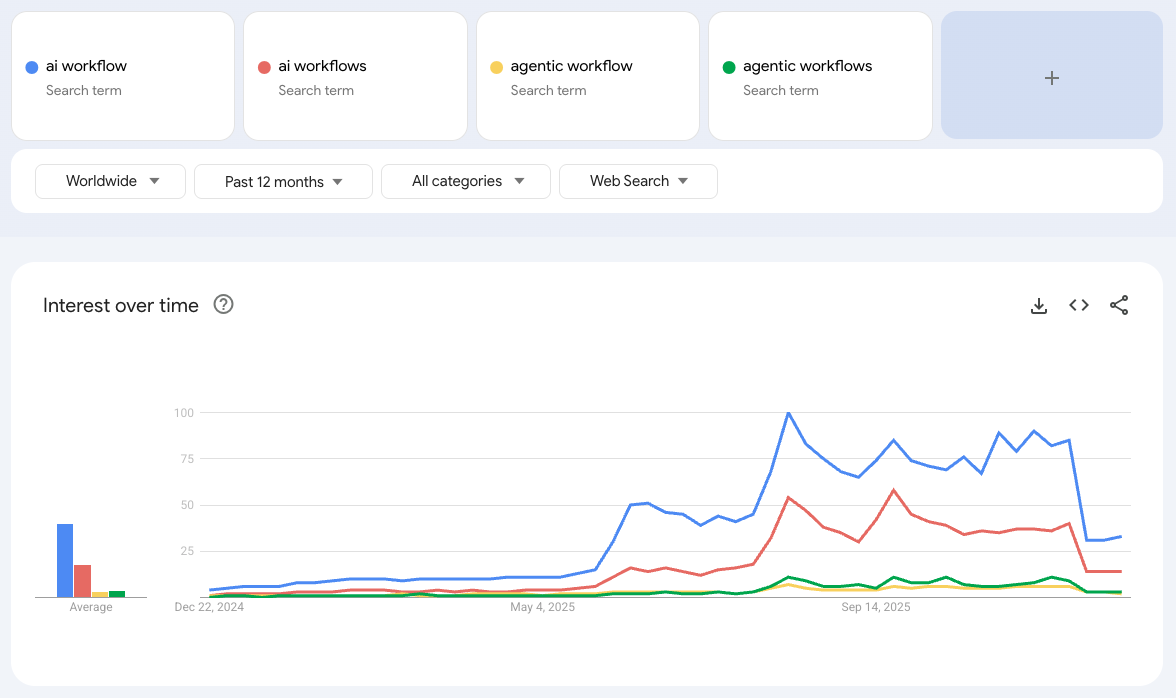
The topic is clearly becoming increasingly popular, and requests from our clients confirm this trend. Although the chart shows a sharp decline close to the end of the year, it looks like interest stabilized at a level. Maybe we are already over the Gartner Hype cycle of agentic workflows, and real use cases are about to pop up next year.
In the end, every single project I was working on in the last few months was built on top of an agentic workflow, even if clients didn’t specifically use this phrase when describing their request, and the trend doesn’t seem to stop, quite the opposite. All of the projects we will start working on in 2026 and leads coming in at the end of 2025 were about exactly the same topic.